How the Autorouter Works
This page explains the autorouter of freeRouting. The routine described here is included from version 2.0.1 onward. Releases up to 2.0.0 still used the maze router ported from the Java program, with expansion rooms, door objects and a connection arena per search. That code has been removed from the source tree, and none of it is described here.
The page is written for users who want to know why the router does what it does, and for programmers who read the C++ source for the first time. The whole router lives in one file, src/autoroute2/engine.cpp. Its entry points are declared in src/autoroute2/session.h.
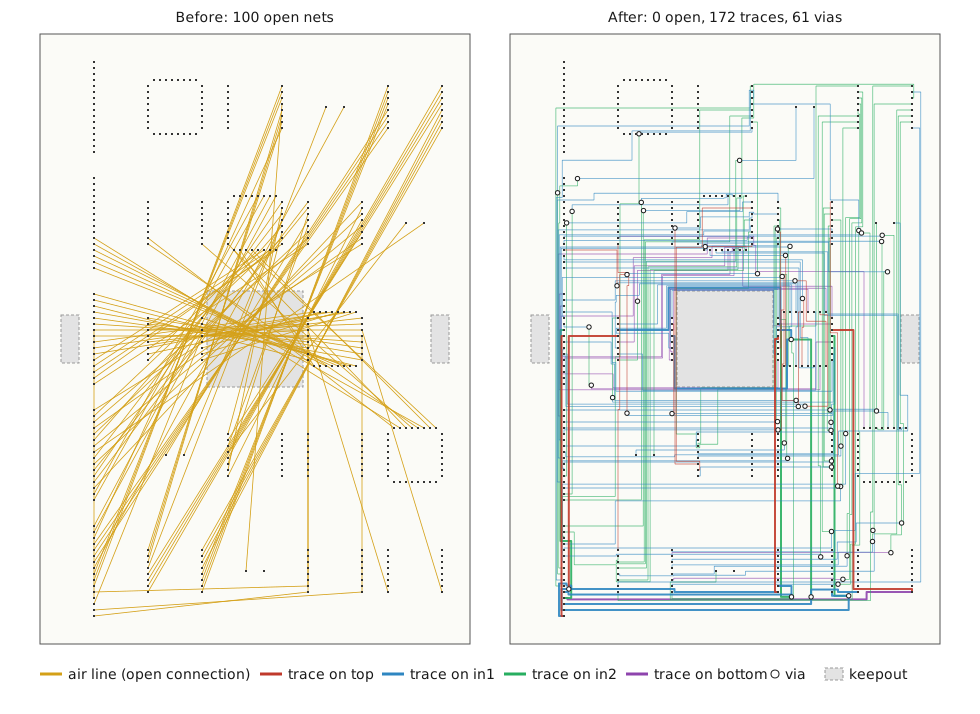
The picture shows what the router is for. On the left, every straight line is an open connection, a pair of pins of the same net that is not joined by copper yet. On the right, the same board after the default run of freeRouting --autoroute (45 degree mode, optimizer on): every net is joined, with 172 traces and 61 vias on four layers. The board is the test fixture ml4_n100.dsn from the freeRouting test set.
Where the router is started
Three functions start the router. All of them work on the RoutingBoard that the window shows, so every trace the router inserts can be undone and is saved into the session file like a hand-routed one.
run_session is the batch run. The Autorouting button, the Routing menu and the headless option --autoroute all end in BatchAutorouterThread, which calls it. It runs until the board is routed, until it cannot make progress any more, or until the user clicks into the board.
route_item routes one open connection of one item. The interactive Autoroute command on selected items (shortcut a) calls it through RoutingBoard::autoroute. fanout_pin gives one single-layer pin a short trace to a new via. The interactive Fanout command calls it through RoutingBoard::fanout. These two calls never rip up other nets.
current_airline returns the straight line between the two ends of the connection that is being searched right now. The window draws it as feedback. It is not the route.
The session
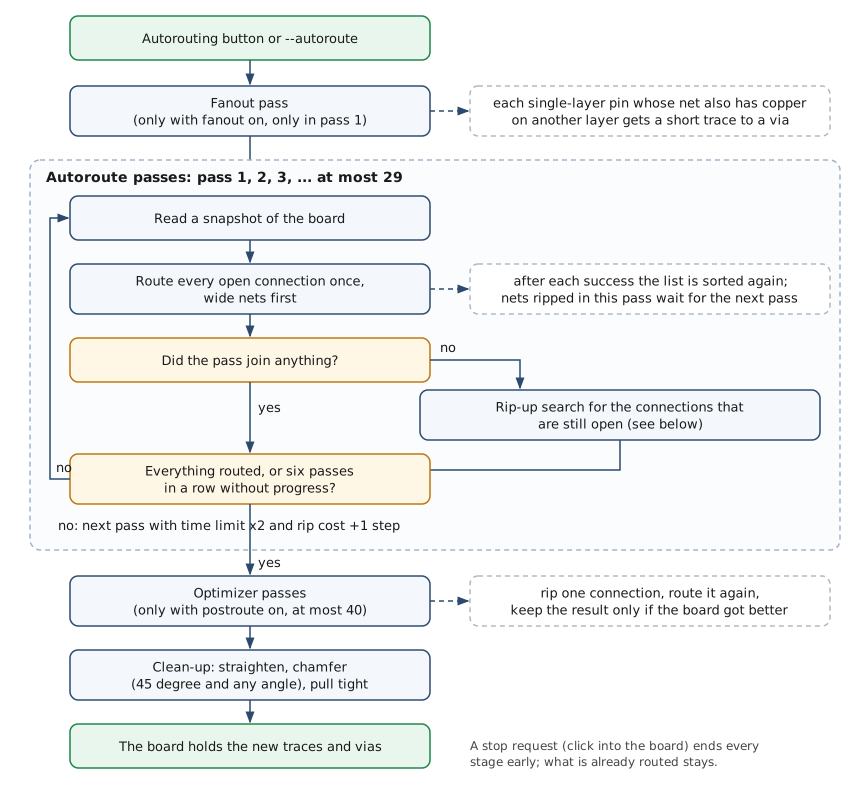
A run has four stages, and each one can be switched off in the Autoroute Parameter window.
The fanout pass comes first, and only when Fanout is on and the start pass is 1. Every pin that sits on one layer, while its net also has copper on another layer, gets a short trace to the first via position the search reaches. On boards with ball grid arrays this frees the pin field before the long connections are laid.
The autoroute passes are the main loop. A pass reads a fresh snapshot of the board, tries every open connection once and increases the pass number. When a pass joins nothing, a rip-up search looks for foreign traces whose removal would let the remaining connections through. The loop ends when nothing is open, after six passes in a row without progress, or when the pass number reaches 30.
The optimizer passes follow when Postroute is on. They take routed connections out one at a time, route them again, and keep the new copper only if the board got better. The clean-up at the end straightens the traces and, in 45 degree and any-angle mode, cuts the corners.
A stop request ends every stage early. Whatever is already on the board stays there, so the user can stop the optimizer at any time and save the result.
A snapshot of the board
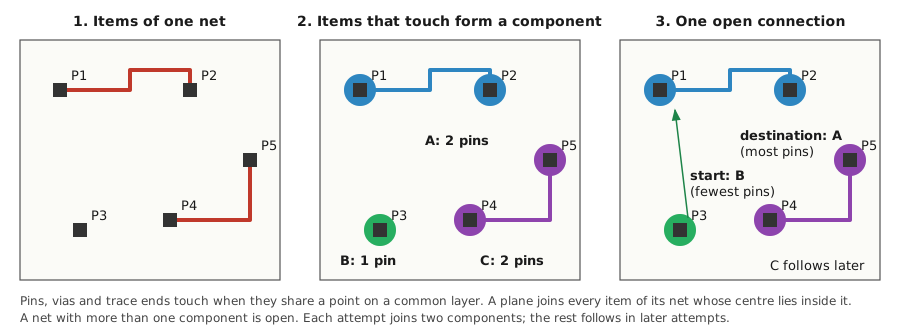
The router does not work on the board objects directly while it searches. At the start of every pass, and after every connection it inserts, read_snapshot copies what it needs into a flat list. Each entry is a pin, a via, a trace, a keepout, a via keepout or a plane, with its net, its layer range, its bounding box and its corner points. Component outlines are left out, because they are not copper.
Items of the same net that share a point on a common layer are joined into components with a union-find. A plane joins every item of its net whose centre lies inside it. A net is open while it consists of more than one component.
The snapshot also stores the numbers that the search needs on every step. The trace half width and the clearance come from the board rules. The horizontal and vertical cost factor of each layer come from the preferred direction and the trace costs in the Detail Autoroute Parameter window. The via cost is Via costs (default 50) times the via radius; on a net with a plane, Powerplane via costs (default 5) is used instead, so vias down to the plane are cheap. The rip-up cost is Ripup start costs (default 100) times the pass number.
Which connection comes next
open_nets turns every open net into one connection. The search starts from the component with the fewest pins and aims at the component with the most pins. On a net with a plane it starts from the side without the plane. A net with three components needs two attempts; after the first one the snapshot is read again, and the rest becomes the next connection.
route_open sorts these connections by trace width, widest first, so power nets are laid while the board is still empty around them. Each net is tried once per pass. After every success the snapshot is read again and the list is sorted again. A net whose traces were ripped up to make room waits for the next pass instead of being routed again at once, which keeps two nets from ripping each other up in a circle.
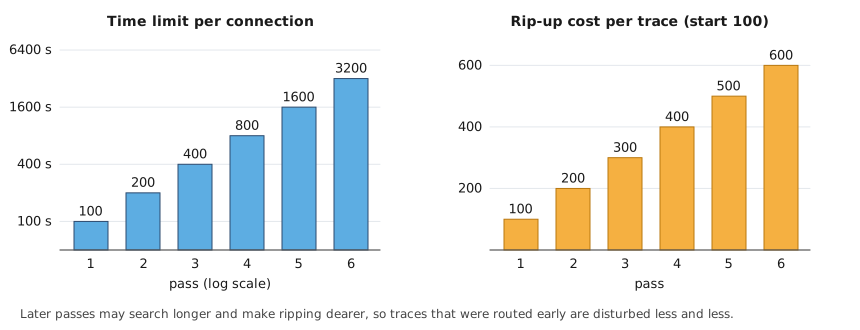
Two numbers grow with the pass number. The time limit of one connection is 100 seconds in pass 1 and doubles with every pass. The rip-up cost grows by the start value with every pass. Early passes are quick and willing to push other nets aside; late passes may search much longer but disturb what is already routed less and less.
Free rooms on one layer
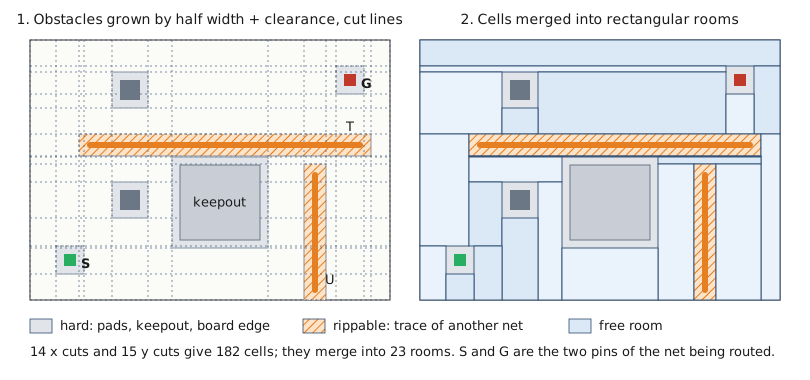
For one connection, build_rooms describes the free space on every active layer as a set of axis-parallel rectangles. Every obstacle is first grown by the half width of the new trace, the half width of its own copper and the clearance between them. After that growth the new trace may run anywhere outside the obstacles with its centre line, which turns the question “does a trace fit here” into “is this point free”.
The edges of the grown obstacles and of the board give the cut lines in x and y. The cut lines split the layer into cells. A cell is hard when a pad, a via, a keepout, the board edge or a trace that may not be ripped covers it; fixed traces, traces of the own net and, when ripping is not allowed, all traces belong to that group. A cell covered only by a rippable trace of another net carries the id of that trace. Every other cell is free. The pins at the two ends of the connection are marked afterwards as start and goal. When a layer has more than 1024 cut lines in one direction, lines closer than one half width are merged, so a dense board does not explode into millions of cells.
Cells with the same label are then merged greedily into maximal rectangles: extend to the right as far as possible, then down as far as the whole width allows. These rectangles are the rooms. In the picture, 14 cut lines in x and 15 in y give 182 cells, which merge into 23 rooms. A room on a rippable trace keeps the id of that trace, so the search knows what it would have to rip up when it walks through.
Doors between rooms
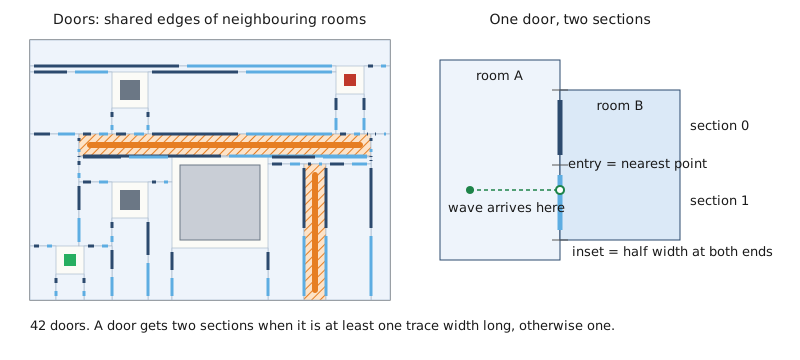
Two rooms on the same layer that share an edge are joined by a door. The wave moves from door to door, never through the inside of a room, because inside a free rectangle any straight line is free anyway.
A door that is at least one trace width long is split into two sections, a shorter one keeps one section. Each section is shortened by a half width at both ends, so a trace that passes the door keeps its distance to the room corners. When the wave reaches a section it enters at the point of that section nearest to where it came from. These entry points become the corners of the route.
Drills between layers
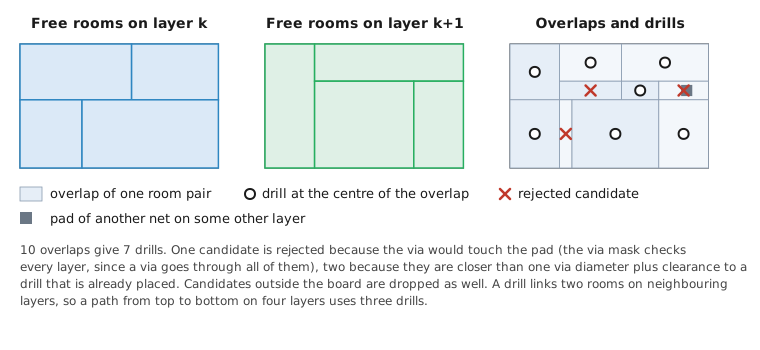
A layer change needs a via. build_drills looks at every pair of rooms on neighbouring layers whose rectangles overlap and puts one candidate at the centre of the overlap. A candidate is dropped when the via does not fit inside the board, when it lies in the via mask, or when it is closer than one via diameter plus clearance to a drill that is already placed.
The via mask is a grid over the board that marks every point where a new via would come too close to a pad, via, trace or keepout on any layer. It is needed because a via goes through all layers, while the rooms only know about their own layer. The drill candidates that survive are the only places where the wave may change the layer.
The wave
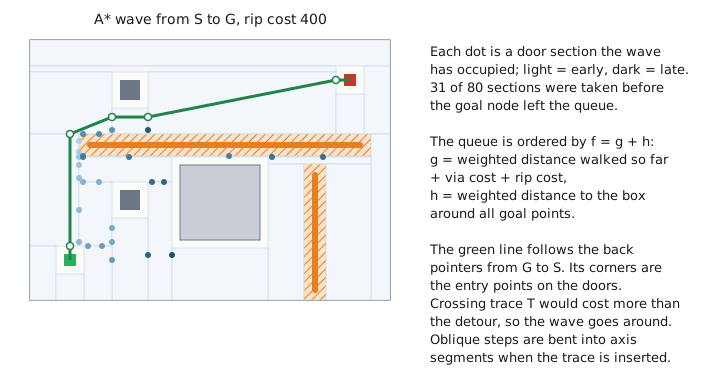
search_wave is an A* search over three kinds of nodes: door sections, drills and the goal. The queue is ordered by f = g + h. The cost g already walked is the weighted distance between entry points, where a horizontal step is multiplied by the horizontal cost factor of the layer and a vertical step by the vertical one. A drill step adds the via cost. The first time the path enters a room that lies on a foreign trace, the rip-up cost of that trace is added. The estimate h is the Manhattan distance to the box around all goal points, weighted with the cost factors of the layer the node is on. It pulls the wave towards the goal, so most of the board is never visited, and the first goal that leaves the queue ends the search. Equal values are taken in the order they were created, so a run is repeatable.
The rip-up cost of a trace is the current rip-up cost times its half width, divided by its detour: the trace length divided by the straight distance of its ends. A wide trace is expensive to rip, and a trace that already makes a long detour is cheap, because it will probably find a better way anyway.
The wave ends when the goal node leaves the queue, when the time limit of the connection is reached, or when the user stops the run. The path is read backwards through the back pointer of every section, where a marker for a drill says “change the layer here”. In the picture 31 of 80 door sections were occupied before the goal was reached, and the path goes around trace T because crossing it would cost more than the detour.
Two shortcuts save work. When both ends lie on the same layer, route_pair first tries the direct line, straight or as one L, and inserts it at once when it is free. And the rooms, doors and drills of the last search are reused as long as nothing on the board changed, the trace width is the same and the rip-up permission is the same; only the wave marks are reset.
From the path to copper
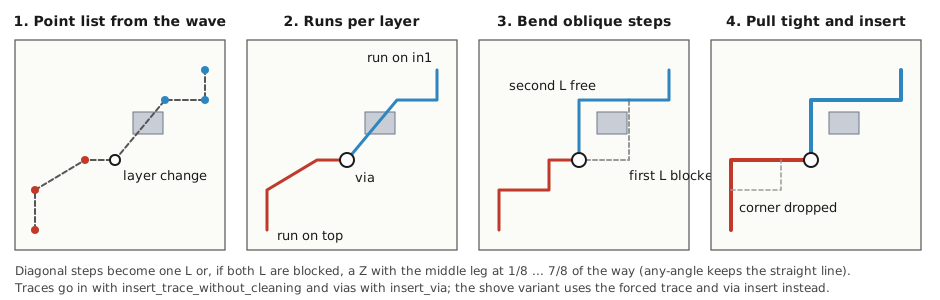
commit_path turns the point list into board items. It cuts the list into one run per layer and puts a via at every layer change; when a via of the same net already sits at that point, it is used instead of a second one. In 90 and 45 degree mode, a step that is neither horizontal nor vertical becomes an L; when both L shapes are blocked, it becomes a Z whose middle leg is tried at one eighth to seven eighths of the way. In 45 degree mode the corners are cut later in the clean-up. Any-angle mode keeps the straight step.
Each run is then pulled tight: corners are removed as long as the shorter line keeps the clearance to every other net. Only when every run has its shape, the traces and vias are inserted with insert_trace_without_cleaning and insert_via, the same board functions the interactive router uses. If one run cannot be bent without a collision, nothing is inserted, so a failed attempt never leaves half a trace.
Crossing other nets: shove first, then rip
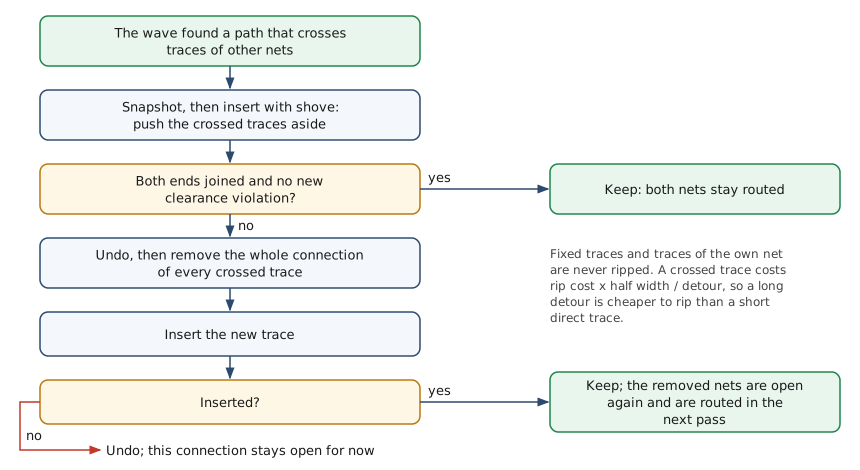
A path that crosses foreign traces is first inserted with shove, the same push the interactive router uses when a trace is dragged through others (insert_forced_trace_polyline). The shove may push traces up to 20 levels deep, vias up to 5, and spring over obstacles up to 5 levels. The board takes a snapshot before, so the attempt can be undone. The result is kept only when both ends of the new connection are joined and no new clearance violation appeared. Then both nets stay routed.
When the shove does not work, the board is restored, the whole connection of every crossed trace is removed, and the new trace is inserted into the space that became free. The removed nets are open again and get their turn in the next pass. Fixed traces and traces of the net itself are never ripped.
When a pass joins nothing
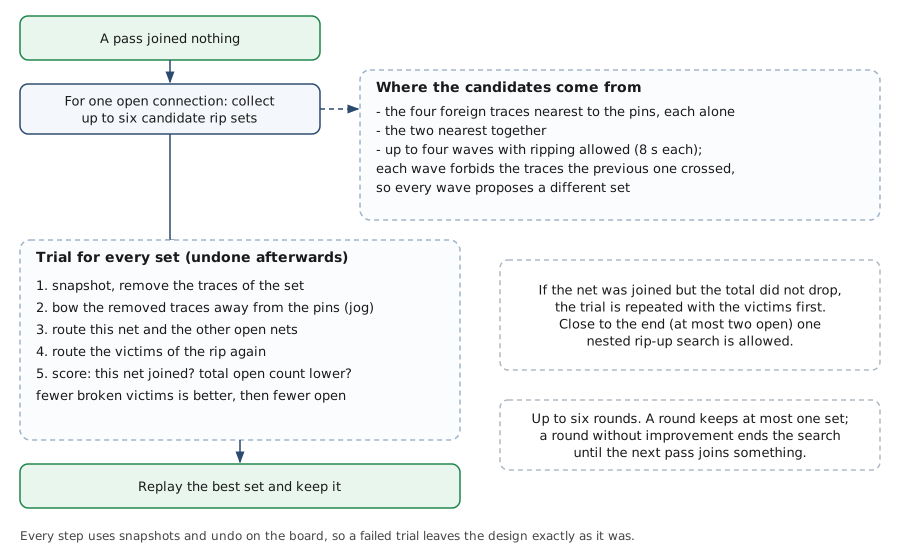
Late in a run, the remaining connections are often blocked by traces that are not in the way of the cheapest path but of every path. When a pass joins nothing, rip_remaining looks at each open connection and collects up to six candidate sets of traces to remove: each of the four foreign traces nearest to the two pins alone, the two nearest together, and the traces crossed by up to four waves that are allowed to rip, with eight seconds per wave. Every wave forbids the traces the previous one crossed, so each proposes a different set.
Each set is tried on a snapshot of the board. The traces are removed, and each of them is put back with a bow around the pins of the target net where that fits, so its own net may stay joined. Then the target net and the other open nets are routed, and after them the nets that are still broken by the removal. If the target net got joined but the total did not drop, the trial is repeated with the broken nets first. Close to the end, when at most two connections are open, one nested rip-up search is allowed inside a trial. A set counts only when the target net got joined and the total number of open connections went down. Among those, the set that leaves the fewest removed nets broken wins, then the one with the fewest open connections. The trial is undone every time; only the winner is replayed and kept.
Up to six rounds run like this. When the search cannot improve the board, it stays off until a normal pass joins something again, so the session does not spend its time on the same hopeless connection.
The optimizer
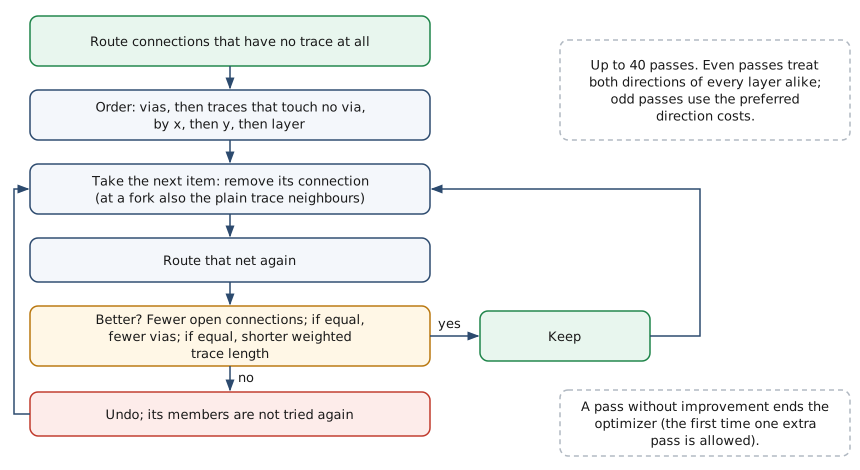
The optimizer runs after the autoroute passes when Postroute is on. A pass first routes connections that have no trace at all. Then it visits the vias of the board and the traces that touch no via, ordered by x, then y, then layer. For each of them it removes the whole connection, and at a fork also the plain trace neighbours, and routes the net again.
The new copper stays only when the board got better: fewer open connections; if equal, fewer vias; if equal, a shorter trace length weighted by the layer costs. Otherwise the board undo restores the old copper, and the items of that connection are not tried again in this pass. Even passes treat both directions of every layer alike, odd passes use the preferred direction costs, so a trace can leave its preferred direction when that saves a via. A pass without improvement ends the optimizer; the first time, one extra pass is allowed. There are at most 40 passes.
Clean-up
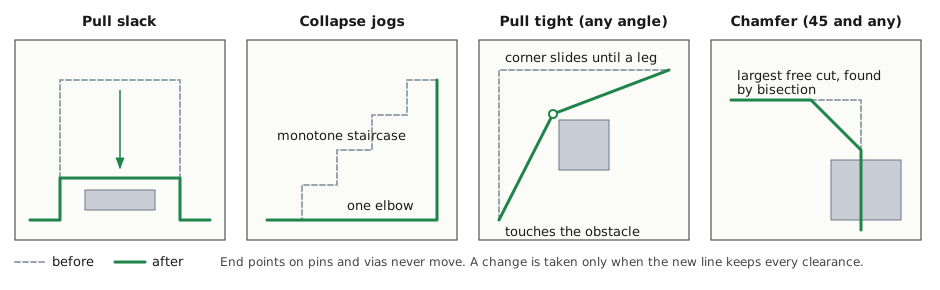
At the end, three steps run on every trace that is not fixed. straighten_routes applies three moves in up to eight rounds, until a round changes nothing: pull slack moves a detour towards the direct line as far as the clearance allows, collapse jogs replaces a monotone staircase by one elbow, and pull tight removes corners. chamfer_routes cuts the right-angle corners in 45 degree and any-angle mode; the cut is the longest one that stays free, found by bisection, and a corner without any free cut stays as it is. pull_tight_routes finally applies the three moves once more and keeps a result only when it has no more corners than before, so the cut corners are not undone.
End points on pins and vias never move, and a change is taken only when the new line keeps every clearance.
Angle modes
The angle mode is the snap angle of the board, set in the window or with --angle for the headless run.
| Mode | Search | Traces on the board |
|---|---|---|
| 90 degree | rooms, doors and drills as described | horizontal and vertical segments only |
| 45 degree | same search | segments are bent into L and Z shapes, then the corners are cut at 45 degrees |
| any angle | same search | the straight step between two entry points is kept, corners are cut as well |
Settings that change the router
| Setting | Effect |
|---|---|
| Active per layer | Inactive layers get no rooms and no drills. |
| Preferred Direction and trace costs | The horizontal and vertical cost factor of each layer in the wave. |
| Vias allowed | Without it no drills are built, and every connection stays on its layer. |
| Via costs, Powerplane via costs | The cost of a drill step, times the via radius. |
| Ripup start costs | The rip-up cost in pass 1; it grows by this value with every pass. |
| Start pass | The first pass number, which sets the first time limit and rip-up cost; fanout runs only when it is 1. |
| Fanout, Autoroute, Postroute | Switch the stages of the session on and off. |
The Speed setting of the old router has no effect on this routine.
Running it without a window
The same session runs from the command line. The design is read, routed, and the session file is written next to it with the ending ses.
freeRouting --autoroute board.dsn
freeRouting --angle 90 --no-postroute --autoroute board.dsn
--angle sets the snap angle to 90, 45 (the default) or any. --no-postroute skips the optimizer.
Where to read next
All functions below are in src/autoroute2/engine.cpp.
| Question | Function |
|---|---|
| Order of fanout, passes, optimizer and clean-up | run_session |
| Interactive autoroute and fanout of selected items | route_item, fanout_pin |
| What the router knows about the board | read_snapshot |
| Which connections are open, and where a search starts | open_nets, pin_incompletes |
| One pass over the open connections | route_open |
| One connection from start to copper | route_pair |
| Free space on one layer | build_rooms |
| Doors and their sections | add_door, link_doors |
| Via candidates | build_drills, via_fits |
| The A* wave | search_wave |
| Rip-up cost of a foreign trace | set_rip_costs |
| Turning the path into traces and vias | commit_path, pull_tight |
| Inserting through other nets | shove_commit |
| Rip-up search when a pass joins nothing | rip_remaining, collect_rip_sets, try_rip_set |
| Straightening and corner cutting | straighten_routes, pull_slack, collapse_jogs, chamfer_routes, miter_polyline |
| The line drawn while a connection is searched | current_airline |